


has heard of Pinterest by now, If you haven’t you must be living under a rock. I joined way before I even started blogging but didn’t use it that much. Now I use it everyday to pin my posts and find other great posts too. In fact I could spend literally hours on there. And it is also my biggest source of traffic! You will also now see on nearly every blog a pin it button. Quite a lot of bloggers have a pin it button pop up when you hoover over a image. I don’t know why, but I don’t like these. I prefer to have the pin it button underneath my images. So today I am going to show you how to get your very own pin it buttons under your images
First when you have finished writing your blog post and named it, go to this Pinterest widget builder.
you will see something that looks like this
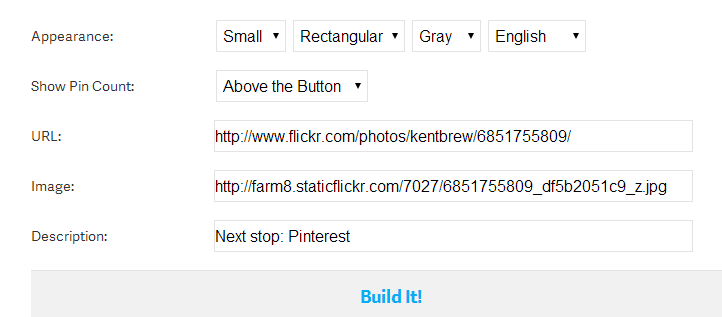
Change the appearance to how you would like it. I normally have the large rectangle in red, with the pin count shown beside the button.
copy and paste your blog post url in the url box
now for the image, right click on the image and select ‘copy image url’ and paste it in the Image box. If you are using blogger then your image url will have extra characters on that you don’t need. For example here is the image url that I copied from yesterdays post Quick Nutty Noodle Stir Fry
http%3A%2F%2F3.bp.blogspot.com%2F-P5fEALt1D6o%2FUvos1LTp3gI%2FAAAAAAAAIkA%2FnzqITwu_2ck%2Fs1600%2Fquick%2Bnutty%2Bnoodle%2Bstir%2Bfry%2B3.jpg&container=blogger&gadget=a&rewriteMime=image%2F*
The parts highlighted in yellow are what you need to delete
Now in the description box write your title. For my post of the Quick Nutty Noodle Stir Fry I wrote
Quick Nutty Noodle Stir Fry from @SerenityYou #recipe #easymeals
I always include my twitter handle. So when someone share my pin on twitter I will be notified and I will go over and thank them and follow them too. If you don’t have a twitter account then it’s always a good idea to include your blog name or blog url. Then I follow this with 2 or 3 hashtags.
Hashtags are great. has your pin will show up when someone uses them words to search for something. Facebook and twitter also use hashtags too. So if someone shares your pin on these, then someone else searches using one of your hastags, the tweet or status will come up of your pin
Do you prefer to use the pin it button like I do or the one that appears when you hoover over the image?
Other posts you may like


This post may contain affiliate links
See my full disclosure

Look at you with the AWESOME tip 🙂 I have been wondering how people did that and now I know 🙂 Thanks!
I have been using a plugin for my pin it button but I like this option a lot better. Though the plugin is easier because I do not have to do it for each post it is just there.
I am pinning this page actually. I have been wondering how to add a pin it button.. Thanks!
Pinterest is a great social media platform and it is very visual so these are some great tips for bloggers.
I’ve tried adding my Twitter handle to Pinterest for that reason but inevitably, it scrapes it incorrectly. It would auto-fill who it *thought* I was trying to reference but never was right so I finally gave up on it.
I like the pin it button that shows up when you hover over an photo.
thank you for this I was wondering how to do this. I also would love new follow me buttons but not sure how to change mine.
I did it but my blog post link didn’t work I may have to try with my flicker account. but that’s great tip thank you. I have been learning all I can about blogging because of how to post like this one or from youtube videos.
I love Pinterest because I find so many great party and recipe ideas on there. I have always wondered how to create pin it buttons on my pictures, so this article is very helpful. I just saved the link and will be coming back to it soon!
Pininterest is really awesome and I never knew that you could do something like this; I think I’m going to try it out myself on the next article I write.
I love pinterest and I pin a lot of interesting blog posts. I think pinterest is essential to growing a blog. Great tips on the pin it widget.
Thanks so much for this!! There are so many ppl that don’t have a pin it button anywhere and it’s frustrating! I pinned it!
Tiffany
Pinterest is awesome for mommy bloggers for sure. It is a great social media button to have. Amber N
This is a great, easy-to-follow tutorial for people to use. Using Pinterest can be a huge boost in blog traffic!
So helpful! I hope that more people add the pin it button – makes it much easier to share content!
I love the convenience that this allots.
Thanks! So helpful!!
I haven’t found a Pinterest button plug-in yet that I really like, so I may give this a try. I do like the look of the hover button though. Decisions, decisions!
This is on my to do list! thank you!
I’m an on and off pinner! Sometimes I spend hours pinning and sometimes I avoid it because it such addictive lol Thank you for sharing this tips that I’m going to pin ^_^
I came from the We did it wednesday! linky. Feel free to visit my blog and say hello… and if you have any advice, I’m ok ^_^
Ally
http://allyandwoozle.com
Thanks for joining the Say G’day Saturday link up. I’ve just pinned this and shared on Google+. Great tutorial!
Hope you can join in again this weekend!
Best wishes,
Natasha in Oz
It’s bloggers like YOU, with great tips like THIS, that help people like ME, be a better blog. Thanks for a great post! 🙂